In recent years, artificial intelligence (AI) has profoundly influenced various sectors, including architecture, city planning and interior design.
Houseplan 2.0 is a prime example of how AI can enhance the design process, streamline workflows, and improve client satisfaction.
Houseplan 2.0 highlight: AI-powered Design
One of the standout features of Houseplan 2.0 is its AI effect which enables users to effortlessly generate and export high-quality images and videos using AI-based tool. Users can easily set parameters and customize the AI effect according to their needs.
To access the AI Effect, Find Home tab > AI panel > Effect tool, shown as below,

Then the AI dialog box will pop up, to generate the AI images and video of your model, the first thing you need to do is to select the model using the Pickup button, shown as below,


Then you can window select the model and adjust view of model in workspace. What’s more, you can set parameters, choose the style and background and input prompts for the AI images,

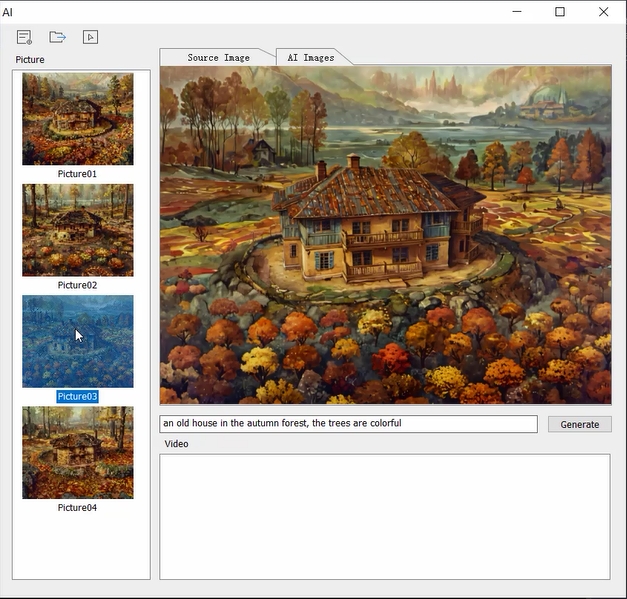
When you are ready for the AI images or videos, just click the Generate button, then you can see the AI Images on the left, shown as below,

You can double click the image or video to display them on the right or right click on the images to delete them or generate video,

To export the images or video to local, click the Exporting button,

Download Houseplan 2.0 and try for free
The AI feature in Houseplan 2.0 not only saves time but also allows architects and designers to explore a wider range of possibilities that may not have considered otherwise. Furthermore, the platform’s user-friendly interface makes it accessible for both professionals and amateurs, bridging the gap between advanced technology and everyday users. As a result, Houseplan 2.0 is transforming the way design projects are approached, fostering collaboration and improving overall efficiency in the design workflow. Houseplan 2.0 is available, please feel free to download
Discover more from Gstarsoft's Blog
Subscribe to get the latest posts sent to your email.






