How to reference objects to file/URL in GstarCAD

In GstarCAD it is possible to link an object to another file.

So if you needed to see the components specifications or 3D model of a certain component from a drawing, you can add hyperlinks to an object. The hyperlinks can be pointed directly to a manufacturer website, to a word document that contains the installation procedure, or to excel file that contains product specifications as samples.

Adding and Using Hyperlink

Adding a hyperlink is very easy. Activate hyperlink from menu: Insert> Hyperlink, or from ribbon: Insert> Data panel.

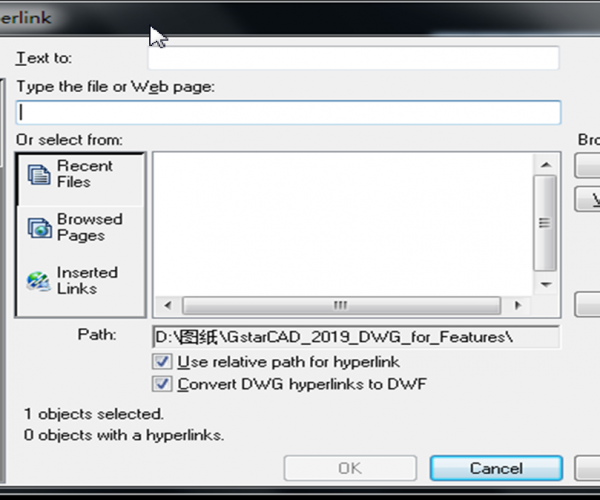
GstarCAD will ask you to select object, then you will see this dialog box:

In this example you can add link to specification document in your local computer, or you might want to point it to a file on your server. Or a page on website. Not only website link and local files, you can link to layout or saved view in your model. You can also link to email address. Maybe you want to link a certain item to vendor contact person for maintenance or something. This can be useful for building maintenance purpose.

How to reference objects to file/URL in GstarCAD


Join our discord community!

Connect with CAD experts, share technical insights, and get real-time support from the global community.

Join Discord Server

Share & Get a $10 Amazon Gift Card

Share your honest GstarCAD feedback and get a chance to win a $10 Amazon gift card.

Write a Review

Discover more from Gstarsoft's Blog

Subscribe to get the latest posts sent to your email.

  • GstarCAD Blog

    www.gstarcad.net

    Related Posts

    Common Methods for Inserting Images in GstarCAD

    In professional CAD workflows, integrating raster images—such as site maps, reference sketches, or interior renders—is essential for visualization and project coordination. However, choosing the wrong insertion method can lead to…

    The Ultimate Guide to GstarCAD Mechanical 2026: The Future of Manufacturing Design

    GstarCAD Mechanical 2026 drafting/design software, covers all fields of mechanical design. Join our discord community! Connect with CAD experts, share technical insights, and get real-time support from the global community.…

    Leave a Reply

    Don't Miss out

    The Intersection of Art and Efficiency: A49’s Digital Evolution with GstarCAD

    • June 4, 2026
    The Intersection of Art and Efficiency: A49’s Digital Evolution with GstarCAD

    Top 5 Essential GstarCAD Shortcuts for Designers

    • May 29, 2026
    Top 5 Essential GstarCAD Shortcuts for Designers

    Common Methods for Inserting Images in GstarCAD

    • May 22, 2026
    Common Methods for Inserting Images in GstarCAD

    Building the Future of Steel: How Tarkon Optimizes Structural Design with GstarCAD

    • May 7, 2026
    Building the Future of Steel: How Tarkon Optimizes Structural Design with GstarCAD

    GstarCAD 2026: Is It Time to Look Beyond the AutoCAD Legacy?

    • April 21, 2026
    GstarCAD 2026: Is It Time to Look Beyond the AutoCAD Legacy?

    Gstarsoft Showcases Integrated CAD + BIM Solutions at BIM World Paris 2026

    • April 3, 2026
    Gstarsoft Showcases Integrated CAD + BIM Solutions at BIM World Paris 2026

    Discover more from Gstarsoft's Blog

    Subscribe now to keep reading and get access to the full archive.

    Continue reading

    Discover more from Gstarsoft's Blog

    Subscribe now to keep reading and get access to the full archive.

    Continue reading

