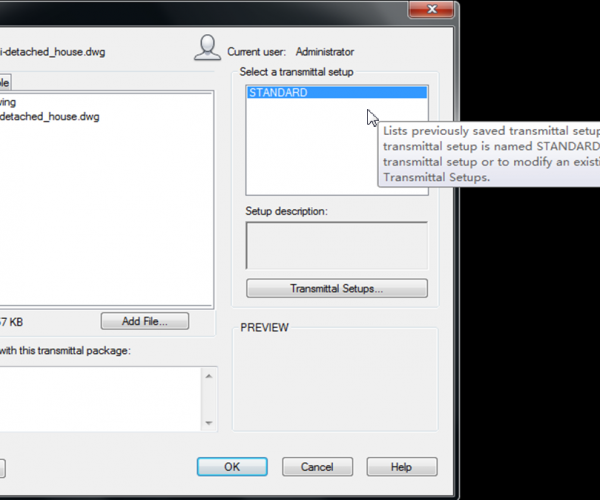
How do I pack my files with eTransmit

Do you often need to send your drawing files to your customers? 

But quite often they have troubles to see all drawing resource attached like reference paths broken or don’t include the plot style table, custom fonts, etc. There is a tool that can be very useful for these situations: eTransmit will pack your related files into a transmittal package. Includes your reference files, plot style table, reorganize your reference path, material textures, data link files, etc. You can open eTransmit by accessing GstarCAD menu: File>eTransmit.


  • GstarCAD Blog

    www.gstarcad.net

    Related Posts

    The Ultimate Guide to GstarCAD Mechanical 2026: The Future of Manufacturing Design

    GstarCAD Mechanical 2026 drafting/design software, covers all fields of mechanical design.

    How to Calculate CAD Area Quickly?

    As a CAD designer, are you frustrated by the cumbersome and error-prone manual CAD area calculation? GstarCAD offers multiple efficient CAD area calculation methods!

    Leave a Reply

    Don't Miss out

    Gstarsoft Showcases Integrated CAD + BIM Solutions at BIM World Paris 2026

    • April 3, 2026
    Gstarsoft Showcases Integrated CAD + BIM Solutions at BIM World Paris 2026

    Boost CAD Productivity with GstarCAD 2026’s XTP Import Feature

    • March 24, 2026
    Boost CAD Productivity with GstarCAD 2026’s XTP Import Feature

    Case study: How TopenTech Optimized Equipment Diagnostics and Field Productivity with GstarCAD

    • March 9, 2026
    Case study: How TopenTech Optimized Equipment Diagnostics and Field Productivity with GstarCAD

    The Ultimate Guide to GstarCAD Mechanical 2026: The Future of Manufacturing Design

    • January 30, 2026
    The Ultimate Guide to GstarCAD Mechanical 2026: The Future of Manufacturing Design

    GstarCAD 2026 DWG Comparison: Boost Design Efficiency

    • January 16, 2026
    GstarCAD 2026 DWG Comparison: Boost Design Efficiency

    How to Calculate CAD Area Quickly?

    • December 25, 2025
    How to Calculate CAD Area Quickly?

    Discover more from Gstarsoft's Blog

    Subscribe now to keep reading and get access to the full archive.

    Continue reading

