How to do simple rendering in CAD

This article covers simple rendering techniques in GstarCAD. You’ll learn how to enhance your designs visually, whether you’re a beginner or an experienced user.

Rendering creates a 2D image based on a 3D scene. It shades the scene’s geometry using the lighting you’ve set up, the materials you’ve applied, and environmental settings such as background and fog. At a basic level, you can use the render command to render your model without applying any materials, adding any lights, or setting up a scene. You cannot move or adjust this light.

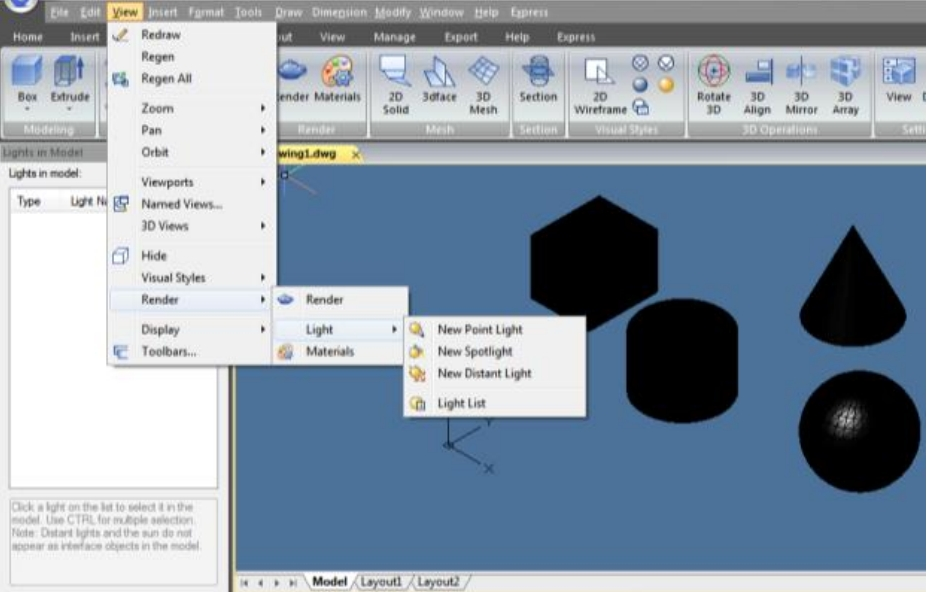
Light

Lighting adds the finishing touch to the scene. You can add point lights, spotlights, and distant lights and set the location and photometric properties of each.

Point Light: A point light radiates light in all directions from its location and does not target an object.

Spotlights: A spotlight can be directed towards an object.

Distant Lights: Simulates the effect of sunlight and can be used to show how the shadows cast by a structure affect the surrounding area.

Light List: Displays a list of type and light name used in model. Distant lights and the sun do not appear as interface objects in the model.

Materials

You can add materials to objects in your drawings to provide a realistic effect. In the context of rendering, materials describe how an object reflects or transmits light. Within a material, maps can simulate textures, bump effects, reflections, or refractions.


Discover more from Gstarsoft's Blog

Subscribe to get the latest posts sent to your email.

GstarCAD Blog

www.gstarcad.net

Related Posts

Do You Really Need Everything in AutoCAD? Why GstarCAD Is Enough for Many CAD Workflows

When companies compare CAD software, they often begin with a long feature checklist. The more functions a product offers, the more capable it may appear. But for engineers, designers, and…

Best Free CAD Software Options in 2026

Finding the right free CAD software can make technical drawing, design review, and project collaboration much easier. Whether you are a student learning CAD, a freelancer working on occasional projects,…

Leave a Reply

Don't Miss out

Do You Really Need Everything in AutoCAD? Why GstarCAD Is Enough for Many CAD Workflows

  • August 13, 2026
Do You Really Need Everything in AutoCAD? Why GstarCAD Is Enough for Many CAD Workflows

Best Free CAD Software Options in 2026

  • August 5, 2026
Best Free CAD Software Options in 2026

Beyond 2D: How CAD Is Evolving into the Foundation of Intelligent Engineering

  • August 4, 2026
Beyond 2D: How CAD Is Evolving into the Foundation of Intelligent Engineering

Parametric Constraints in Dynamic Blocks: What’s New in GstarCAD 2027

  • July 29, 2026
Parametric Constraints in Dynamic Blocks: What’s New in GstarCAD 2027

Why Cloud Matters for CAD: From Standalone Drafting to Connected Workflows

  • July 15, 2026
Why Cloud Matters for CAD: From Standalone Drafting to Connected Workflows

Design Intelligence for an Integrated Future: Gstarsoft Strengthens Its Open CAD+BIM+AI Ecosystem

  • June 19, 2026
Design Intelligence for an Integrated Future: Gstarsoft Strengthens Its Open CAD+BIM+AI Ecosystem

Discover more from Gstarsoft's Blog

Subscribe now to keep reading and get access to the full archive.

Continue reading

Discover more from Gstarsoft's Blog

Subscribe now to keep reading and get access to the full archive.

Continue reading


