Why my hatch object has no area property?

Some users may wonder why their hatch object has no area property. There are several reasons for this issue.
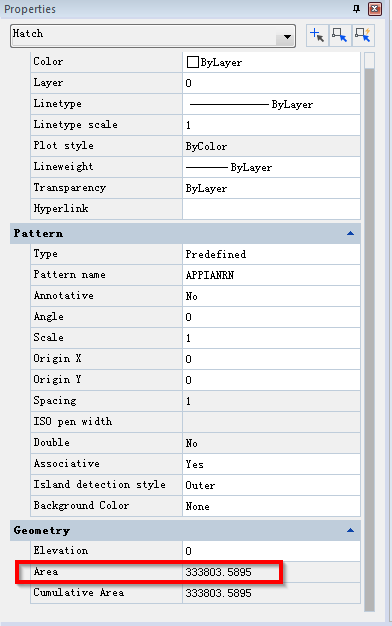
Hatch with Area property
Hatch without Area property
  1. The hatch boundary self-intersect

If the hatch boundary is self-intersected polyline or spline, then the hatch would have no area whether it’s a hatch created by picking points or by selecting objects.

We can see the above hatch object has apparent self-intersection, but most of the time the self-intersection of hatch boundary is not noticeable and we’ll need to zoom it.

2. Boundary not closed

The following hatch is a very simple yet has no area property, but if we take a closer look at it, we’ll find that it’s not closed, object like this has no area.

3. The boundary has overlapped lines

If we have overlapped lines for the boundary and we hatch by selecting object, the hatch would have no area as well. To fix this, we can remove the redundant lines.

4. Unnecessary line within the hatch

Sometimes there may be lines within the hatch which could lead to the hatch has no boundary. The following is two concentric circles with a line, the hatched region has no area property because of the line,

If you know other reasons for this issue, please leave a comment and share with us.


Discover more from Gstarsoft's Blog

Subscribe to get the latest posts sent to your email.

GstarCAD Blog

www.gstarcad.net

Related Posts

AI Rendering Workflow: How GstarRender Improves Design Visualization

Design visualization is often fragmented. A designer may use one tool to explore an initial idea, another to refine the visual direction, additional software for rendering and post-processing, and yet…

What Is CAD? A Beginner’s Guide to Learning CAD

If you are new to engineering, architecture, manufacturing, or design, one of the first questions you may ask is: What is CAD? CAD stands for Computer-Aided Design. It refers to…

Leave a Reply

Don't Miss out

AI Rendering Workflow: How GstarRender Improves Design Visualization

  • September 8, 2026
AI Rendering Workflow: How GstarRender Improves Design Visualization

What Is CAD? A Beginner’s Guide to Learning CAD

  • September 1, 2026
What Is CAD? A Beginner’s Guide to Learning CAD

Interior Design Software: From Floor Plans to AI-Powered Visualization

  • August 25, 2026
Interior Design Software: From Floor Plans to AI-Powered Visualization

The Question Will Not Be “CAD or BIM,” but How They Work as One

  • August 21, 2026
The Question Will Not Be “CAD or BIM,” but How They Work as One

How GstarRender Turns Your Ideas into Stunning, Presentation-Ready Design Visuals

  • August 18, 2026
How GstarRender Turns Your Ideas into Stunning, Presentation-Ready Design Visuals

Do You Really Need Everything in AutoCAD? Why GstarCAD Is Enough for Many CAD Workflows

  • August 13, 2026
Do You Really Need Everything in AutoCAD? Why GstarCAD Is Enough for Many CAD Workflows

Discover more from Gstarsoft's Blog

Subscribe now to keep reading and get access to the full archive.

Continue reading

Discover more from Gstarsoft's Blog

Subscribe now to keep reading and get access to the full archive.

Continue reading



