What to do with duplicate or overlapping objects in a drawing? Try Overkill command

Sometimes there would be completely duplicate or overlapping objects such as lines, arcs, polylines, etc.

This not only increases the data the CAD system has to deal with, but also negatively impact the creating and editing of an object, so you’d better get rid of the duplicate or overlapping objects with Overkill command. Overkill command also combines those that are partially overlapping or contiguous.
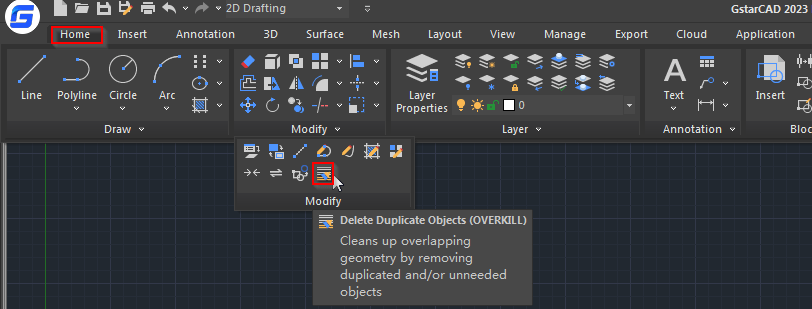
After executing the command, you’re prompted to select an object,

Then the following Overkill dialog box will pop up,

In removing or combining objects, only objects that have shared properties will be combined, but you can choose to ignore color, layers, linetype, etc. and remove or combine overlapping objects that are of different colors or layers.

The following are examples of using it to remove duplicate objects:

  1. remove duplicate objects

When there are two or more overlapping objects, we normally keep one and delete the other,

2. Remove duplicate arcs

3. remove duplicate section of polylines

When a line, arc polyline has overlapping section with other polylines, the CAD system will remove the overlapping section.

When polyline overlaps with another polyline, the CAD system will also remove the overlapping section.


Discover more from Gstarsoft's Blog

Subscribe to get the latest posts sent to your email.

GstarCAD Blog

www.gstarcad.net

Related Posts

How to work with raster images in CAD?

A raster image in CAD (Computer-Aided Design) refers to a type of digital image that is composed of a grid of individual pixels, each with its own color value.

How to work with multiple views of a single drawing?

GstarCAD supports opening and working with several views of the same drawing simultaneously.

Leave a Reply

Don't Miss out

GstarCAD Deep Dive: What’s New in Batch Plotting for 2027?

  • October 20, 2026
GstarCAD Deep Dive: What’s New in Batch Plotting for 2027?

Old Factory Renovation with AI Rendering: Reimagine Industrial Buildings with GstarRender

  • October 15, 2026
Old Factory Renovation with AI Rendering: Reimagine Industrial Buildings with GstarRender

GstarCAD Deep Dive: What Really Happens Inside a CAD Block?

  • September 29, 2026
GstarCAD Deep Dive: What Really Happens Inside a CAD Block?

GstarCAD Deep Dive: How Multiple Top-Level Windows Change Multi-Drawing Workflows

  • September 23, 2026
GstarCAD Deep Dive: How Multiple Top-Level Windows Change Multi-Drawing Workflows

Gstarsoft and AppliCAD Launch GstarSolutions Thailand, Deepening Their Partnership in the Thai Market

  • September 21, 2026
Gstarsoft and AppliCAD Launch GstarSolutions Thailand, Deepening Their Partnership in the Thai Market

Modernizing Without Disruption: What European SMEs Can Learn from SNIE’s Experience

  • September 18, 2026
Modernizing Without Disruption: What European SMEs Can Learn from SNIE’s Experience

Discover more from Gstarsoft's Blog

Subscribe now to keep reading and get access to the full archive.

Continue reading