How to hide and isolate selected objects?

Hiding an object is to make it invisible, and isolating an object is similar to layer isolation, which is to temporarily hide all objects except the selected ones.

Why we need to hide objects?

When some graphic objects affect what are drawing, we can hide them to make them invisible so that they don’t affect our drawing. When our drawing is finished, then we can make them visible.

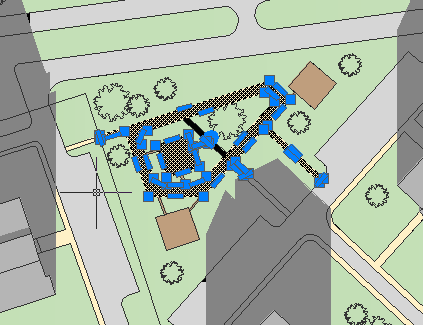
  1. Select objects to be hidden or isolated, as shown in the following picture,
before selecting
after selecting

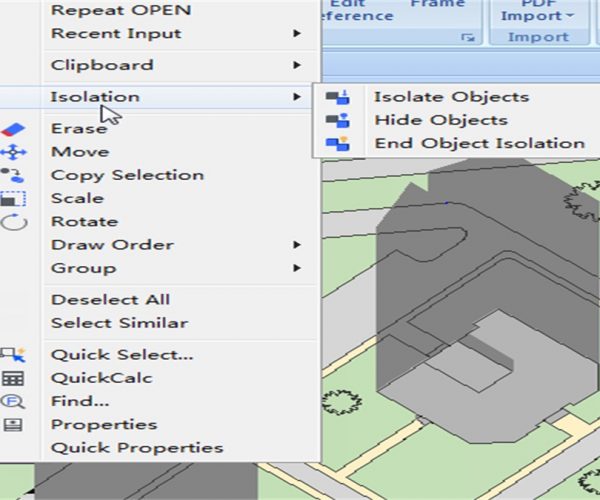
2. Right-click, select Isolation, as shown in the following picture,

3. If you selected Isolation > Isolate Objects, then you get the following,

4. If you selected Isolation > Hide Objects, you get the following,


Discover more from Gstarsoft's Blog

Subscribe to get the latest posts sent to your email.

GstarCAD Blog

www.gstarcad.net

Related Posts

Why Cloud Matters for CAD: From Standalone Drafting to Connected Workflows

For many engineers and designers, CAD work has long been centered on desktop software. A drawing is created on a workstation, saved as a local file, and then shared with…

Design Intelligence for an Integrated Future: Gstarsoft Strengthens Its Open CAD+BIM+AI Ecosystem

Xi’an, China— June 17, 2026 — Gstarsoft, the global provider of industrial software and digital design solutions, today unveiled its latest design portfolio spanning CAD, BIM, cloud solutions and AI…

Leave a Reply

Don't Miss out

Why Cloud Matters for CAD: From Standalone Drafting to Connected Workflows

  • July 15, 2026
Why Cloud Matters for CAD: From Standalone Drafting to Connected Workflows

Design Intelligence for an Integrated Future: Gstarsoft Strengthens Its Open CAD+BIM+AI Ecosystem

  • June 19, 2026
Design Intelligence for an Integrated Future: Gstarsoft Strengthens Its Open CAD+BIM+AI Ecosystem

GstarCAD 2027: Unleashing Performance and Innovation for Modern Engineering

  • June 11, 2026
GstarCAD 2027: Unleashing Performance and Innovation for Modern Engineering

The Intersection of Art and Efficiency: A49’s Digital Evolution with GstarCAD

  • June 4, 2026
The Intersection of Art and Efficiency: A49’s Digital Evolution with GstarCAD

Top 5 Essential GstarCAD Shortcuts for Designers

  • May 29, 2026
Top 5 Essential GstarCAD Shortcuts for Designers

Common Methods for Inserting Images in GstarCAD

  • May 22, 2026
Common Methods for Inserting Images in GstarCAD

Discover more from Gstarsoft's Blog

Subscribe now to keep reading and get access to the full archive.

Continue reading

Discover more from Gstarsoft's Blog

Subscribe now to keep reading and get access to the full archive.

Continue reading