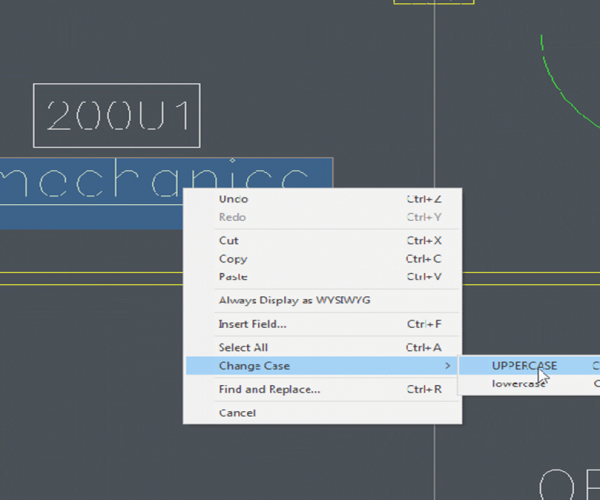
How do I change Mtext to lower or upper case

You might make a mistake and want to change the text case… either to lower case or upper case.

Do you need to re-type it? No way! It is easy to do.

  1. Select the word you want to change for.
  2. Right-click in the word, select the CHANGE CASE option> Lower case or Upper case from the context menu

4. Alternatively, press [Ctrl] + [Shift] + U to set the text to upper Case OR press [Ctrl] + [Shift] + L to set the text to lower case.

  • GstarCAD Blog

    www.gstarcad.net

    Related Posts

    The Ultimate Guide to GstarCAD Mechanical 2026: The Future of Manufacturing Design

    GstarCAD Mechanical 2026 drafting/design software, covers all fields of mechanical design.

    How to Calculate CAD Area Quickly?

    As a CAD designer, are you frustrated by the cumbersome and error-prone manual CAD area calculation? GstarCAD offers multiple efficient CAD area calculation methods!

    Leave a Reply

    Don't Miss out

    Gstarsoft Showcases Integrated CAD + BIM Solutionsat BIM World Paris 2026

    • April 3, 2026
    Gstarsoft Showcases Integrated CAD + BIM Solutionsat BIM World Paris 2026

    Boost CAD Productivity with GstarCAD 2026’s XTP Import Feature

    • March 24, 2026
    Boost CAD Productivity with GstarCAD 2026’s XTP Import Feature

    Case study: How TopenTech Optimized Equipment Diagnostics and Field Productivity with GstarCAD

    • March 9, 2026
    Case study: How TopenTech Optimized Equipment Diagnostics and Field Productivity with GstarCAD

    The Ultimate Guide to GstarCAD Mechanical 2026: The Future of Manufacturing Design

    • January 30, 2026
    The Ultimate Guide to GstarCAD Mechanical 2026: The Future of Manufacturing Design

    GstarCAD 2026 DWG Comparison: Boost Design Efficiency

    • January 16, 2026
    GstarCAD 2026 DWG Comparison: Boost Design Efficiency

    How to Calculate CAD Area Quickly?

    • December 25, 2025
    How to Calculate CAD Area Quickly?

    Discover more from Gstarsoft's Blog

    Subscribe now to keep reading and get access to the full archive.

    Continue reading


