Interior design software is a digital tool that assists designers in creating and visualizing various aspects of interior spaces.
What is Interior Design Software?
Interior design software is a digital tool that assists designers in creating and visualizing various aspects of interior spaces. These tools are essential for designing floor plans, arranging furniture, and experimenting with color schemes and materials—all within a virtual environment. By using interior design software, designers can produce detailed 2D and 3D renderings of spaces, allowing them to explore different layouts, finishes, and furnishings before any physical work begins.

The primary functions of interior design software include:
Floor Planning: Users can draw precise floor plans, define room dimensions, and place structural elements. This helps in organizing the layout of a space effectively.
3D Visualization: The software converts 2D plans into detailed 3D models, offering a realistic view of how the finished space will look. This includes lighting, textures, and furniture placement.
Material and Furniture Selection: Designers can choose from extensive libraries of materials, textures, and furniture to see how different options impact the overall design.
Design Simulation: The software often includes features for simulating different design scenarios, such as lighting conditions and spatial arrangements, to help make informed decisions.
Collaboration: Many tools allow for real-time collaboration, enabling designers to share their work with clients or team members for feedback and adjustments.
What Software do Interior Designers Use?
What software do interior designers use? To assist in this, we reviewed 10 popular design tools available in 2025, such as Houseplan, SketchUp, Floorplanner, and HomeByMe. Our research provides in-depth introductions to each software, highlighting their strengths and weaknesses. We also outline their target audiences, pricing details, and overall recommendation ratings. This comprehensive evaluation is designed to help you select the best interior design software tailored to your specific needs and preferences.
What is the Interior Design Software & Tools in 2025?
1. Houseplan
2. SketchUp
3. Floorplanner
4. HomeByMe
5. Foyr Neo
6. Planner 5D
7. SmartDraw
8. 3Ds Max
9. AutoCAD
10. Blender
* The ranking of software introductions is not specific, and analysis suggestions and prices are for reference only, which may vary due to different reasons.
* All trademarks, logos and brand names are the property of their respective owners.
10 Best Free Interior Design Software & Tools in 2025
1.Houseplan
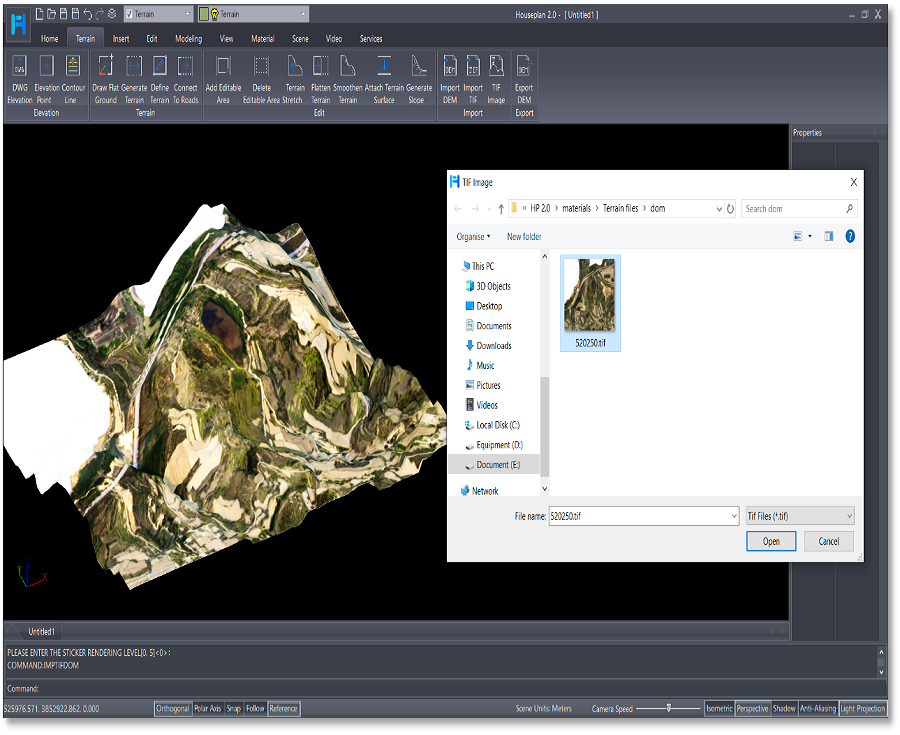
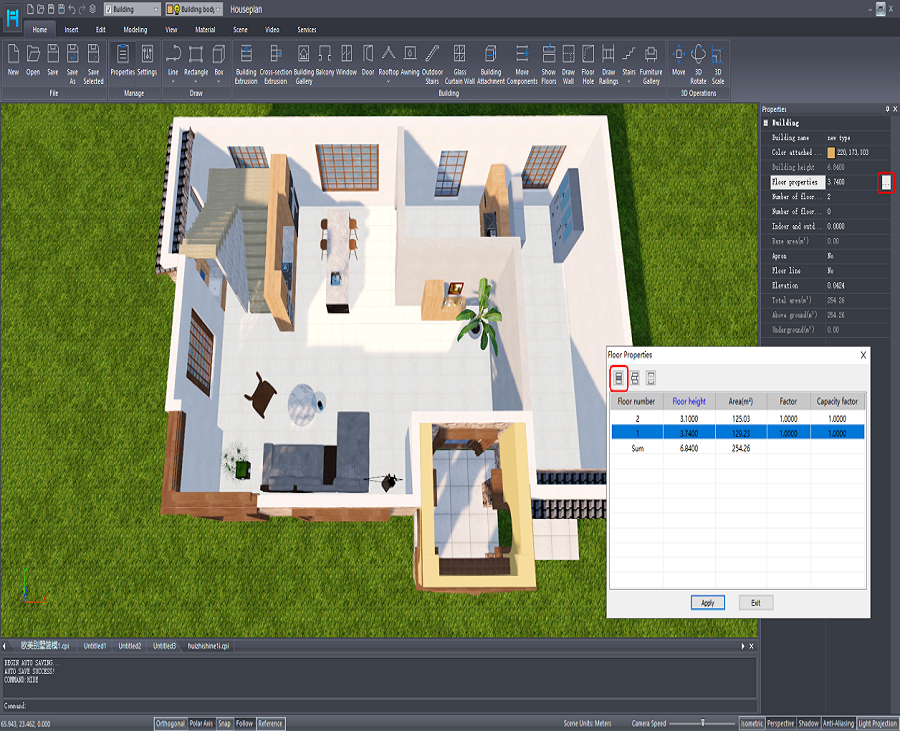
Houseplan is a powerful, easy-to-learn, lightweight, and compatible 3D modeling and real-time rendering software that can create 3D models quickly and demonstrate your scheme independently. Its multiple modeling methods, convenient real-time rendering, and plenty of 3D model and texture resources offer you great work experience and design results without plug-ins and other software.

Available for Windows users, Houseplan can create houses, apartments, building complex and pool, etc. It’s user-friendly for both novice users and seasoned professionals with intuitive interface as well as easy-to-use tools. Houseplan helps interior designers quickly add 3D models and bring their ideas into reality. It is a versatile solution for interior design and much more.

Target Audience:
Houseplan is designed to cater to a broad spectrum of users, ranging from hobbyists to professional architects, city planners, interior designers, landscape designers, etc. The software’s intuitive interface and easy-to-use tools make it an excellent choice for beginners, while its support for advanced modeling and rendering tools appeals to more experienced professionals looking to enhance their workflow and take their design to the next level.
Pros:
- File formats Compatibility: With Houseplan, you can easily import DWG drawings and directly extrude them. Additionally, it supports the importing of oblique photography and point cloud data, as well as various other file formats.
- Advanced and Quick Modeling:Houseplan offers the most efficient 3D modeling for building planning, helping you complete your scheme design quickly and easily with just a few clicks. Houseplan offers advanced 3D modeling tools to satisfy diverse and complicated modeling requirements. It’s simpler, lighter, and easier to use than other large and complex software on the market.
- Real-time Rendering: Houseplan uses a high-performance rendering engine to sync 3D model editing with simulations, providing interactive and responsive environments that display rendered results instantly.
- Photo-realistic entities and animation: Houseplan enables convenient addition of interior desgin elements. Moreover, you can easily add animation entities and set their movements.
- Easy and convenient output: Houseplan provides tools for specifying camera points and video paths, allowing users to export images and videos. It also supports VR device viewing. Additionally, users can publish their designs as .exe files for independent operation, enabling image and video viewing, drawing new video paths, displaying properties, and switching weather environments.

Pricing:
Houseplan offers flexible liensing options to meet different needs:
- Perpetual licence: A one-time fee allows user to access Houseplan indefinitely. The perpetual license never expires and can be used forever.
- Yearly Subscription: Houseplan also provides a subscription-based license. Having an annual software license is almost like renting it for a year.
- Upgrade: Upgrade previous Houseplan Perpetual license to the latest version.
The flexible licensing options ensure that whether you’re a hobbyist or professional, there’s a Houseplan plan that fits your needs and budget.
2. SketchUp
SketchUp is a versatile 3D modeling software renowned for its user-friendly interface, empowering architects, interior designers, and various professionals to bring their creative concepts to life. Whether working on small-scale projects or large architectural designs, SketchUp offers a comprehensive set of tools that streamline the design process, allowing users to transform ideas into detailed 3D models efficiently. The software’s simplicity and intuitive features make it accessible to beginners while offering robust capabilities for experienced designers.
Target Audience:
SketchUp is designed to cater to a broad spectrum of users, ranging from hobbyists and students to professional architects, interior designers, and landscape designers. It is particularly well-suited for those involved in conceptual design, architectural visualization, and interior design. The software’s ease of use makes it an excellent choice for beginners, while its support for advanced tools and extensions appeals to more experienced professionals looking to enhance their workflow. SketchUp is also a valuable tool for educators and students, providing a platform to learn and practice 3D modeling without a steep learning curve.
Pros:
- User-Friendly Interface: SketchUp’s intuitive design and ease of use make it accessible to users of all skill levels.
- Push/Pull Modeling: The push/pull feature allows for quick and easy modeling, making it ideal for rapid prototyping and design exploration.
- Extension Support: Advanced users can enhance SketchUp’s functionality with a wide range of extensions tailored to specific needs, such as architectural design or landscape planning.
- Free Version: SketchUp offers a free version, making it accessible to hobbyists, students, and those new to 3D modeling.
- Vast 3D Model Library: The extensive 3D Warehouse library provides a rich resource for pre-built models, saving time and effort in the design process.
Cons:
- Lacks Parametric and BIM Features: SketchUp does not offer parametric or data-driven features (BIM), limiting its use in more complex architectural and construction workflows.
- Issues with Solids-Based Modeling: As a non-solids-based modeler, users may encounter problems such as reversed faces if not modeled carefully.
- Challenges in BIM Integration: Over-modeling during the conceptual design phase can complicate the transition to BIM, making it challenging to translate designs into detailed architectural plans.
Pricing:
SketchUp offers a range of pricing options to suit different needs:
- SketchUp Free: A web-based version ideal for hobbyists and beginners, providing essential modeling tools at no cost.
- SketchUp Pro: Priced at $299 per year, this version includes advanced modeling tools, access to the 3D Warehouse, and support for extensions, making it suitable for professionals and serious designers.
- SketchUp Studio: Targeted at architecture professionals, SketchUp Studio is priced at $699 per year. It includes all Pro features plus additional tools for energy analysis, VR support, and collaboration features.
These pricing tiers ensure that whether you’re a hobbyist, student, or professional, there’s a SketchUp plan that fits your needs and budget.
3. Floorplanner
Floorplanner is a web-based interior design and floor planning software that simplifies the process of creating detailed 2D and 3D layouts. Known for its ease of use, Floorplanner automatically sets the correct scale for your designs, making it effortless to drag and drop elements like doors, windows, and furniture into your plans. With a simple click, users can switch between 2D and 3D views to visualize their designs from multiple angles, producing professional-quality images with minimal effort. Whether you’re working on a small room or an entire building, Floorplanner provides the tools needed to bring your design ideas to life efficiently.
Target Audience:
Floorplanner is designed for a wide range of users, from professional interior designers and architects to real estate agents, home renovators, and even hobbyists. Its intuitive interface and web-based platform make it accessible to amateurs who are new to design software, as well as professionals seeking a straightforward tool for creating quick layouts and space planning. The software is particularly useful for those involved in residential and commercial interior design, event planning, and property management. Additionally, educators and students can benefit from Floorplanner’s free plan, making it a valuable resource for learning and practicing design skills.
Pros:
- User-Friendly Interface: Floorplanner’s drag-and-drop functionality and automated scaling make it easy to use, even for beginners.
- Web-Based Accessibility: Being a web-based tool, Floorplanner is accessible from any device with an internet connection, making it convenient for collaborative projects.
- Extensive Object Library: The platform boasts a vast library of over 150,000 objects, allowing users to furnish their designs with a wide variety of elements.
- 2D and 3D Visualization: Users can seamlessly switch between 2D and 3D views, enabling comprehensive visualizations of their designs.
- Free Plan Available: Floorplanner offers a free version that provides essential features, making it accessible to those with basic design needs.
Cons:
- Limited Customization: Users may find the inability to customize the size and measurements of objects like tables and chairs restrictive, leading to challenges in accurately representing real-world dimensions.
- Object Catalog Limitations: The limited catalog of furniture and objects can be a drawback for users who require specific items for their designs, as importing custom objects is not supported.
- No Desktop App: While the web-based nature of Floorplanner is a benefit for many, some users may prefer a desktop application for offline access and more robust performance.
Pricing:
Floorplanner offers a range of pricing plans to accommodate different user needs:
- Free Plan: Ideal for amateur designers, students, and those with basic design requirements. This plan provides access to core features, including 2D and 3D design capabilities, but with limited object library access.
- Starter Plan: Starting at $5 per user per month, this plan includes additional features such as export options, more extensive object libraries, and higher-resolution rendering, making it suitable for more serious users and small design projects.
- Plus Plan: Priced at $29 per user per month, this plan offers enhanced features, including access to advanced tools, priority support, and the ability to create multiple projects, making it ideal for professionals and small businesses.
- Pro Plan: The most comprehensive option, starting at $59 per user per month, is tailored for professionals and teams working on large-scale projects, offering all the advanced features needed for detailed and complex designs.
These pricing options ensure that whether you’re a casual user or a professional designer, Floorplanner has a plan that fits your budget and design needs.
4. HomeByMe
HomeByMe is a free, online interior design and planning software that allows users to create detailed 3D models of their living spaces. It provides a comprehensive suite of tools for floor plan creation, furniture arrangement, color scheme selection, and design visualization, making it an invaluable resource for interior designers, architects, and homeowners alike. HomeByMe’s standout features include drag-and-drop furniture placement, customizable floor plans, and immersive virtual tours that bring your designs to life. Additionally, the platform’s community aspect fosters collaboration and inspiration, allowing users to share their designs, seek feedback, and explore a wide range of ideas from others in the HomeByMe community.
Target Audience:
HomeByMe is designed for a diverse audience, ranging from professional interior designers and architects to homeowners and DIY enthusiasts. The software is accessible to users of all skill levels, offering intuitive tools that cater to beginners while providing advanced features for experienced designers. Whether you’re a professional looking to present design concepts to clients or a homeowner planning a renovation, HomeByMe offers the flexibility and functionality needed to create stunning interior designs. The platform is also ideal for educators and students in design-related fields, providing a practical tool for learning and experimentation.
Pros:
- Community Hub: The HomeByMe community is a valuable resource for inspiration, idea exchange, and feedback, allowing users to connect with others and enhance their designs.
- Immersive Virtual Tours: Users can take virtual tours of their designed spaces, offering a realistic and immersive experience that helps visualize the final result.
- Real-World Products: The software’s catalog includes actual products from various brands, enabling users to furnish their spaces with items that can be purchased in real life.
- Multi-Platform Accessibility: HomeByMe is available on all systems and can be accessed anywhere with a stable internet connection, making it convenient for on-the-go design work.
Cons:
- Watermarked Images: The free version of HomeByMe applies watermarks to rendered images, which may detract from the professional presentation of designs.
- Rendering Time: Low-resolution photorealistic images can take some time to render, which might be frustrating for users working under tight deadlines.
- Limited Customization: While the software offers a broad range of tools, it lacks features for simulating custom pools, advanced roof systems, and environmental effects like rain or snow, which could limit its use in certain projects.
Pricing:
HomeByMe offers several pricing options to accommodate different user needs:
- Free Plan: Ideal for beginners, DIY enthusiasts, and those with basic design requirements. The free plan provides access to essential design tools but includes watermarks on rendered images.
- Pay-Per-Project: For those needing more advanced features, HomeByMe offers a pay-per-project option, allowing users to purchase additional capabilities as needed without committing to a subscription.
- Subscription Plans: HomeByMe offers monthly or annual subscriptions, starting at a competitive price. These plans unlock advanced features such as high-resolution rendering, additional storage, and enhanced project management tools, making them suitable for professional designers and frequent users.
These pricing options ensure that whether you’re a casual user exploring interior design or a professional seeking a comprehensive design tool, HomeByMe provides a plan that fits your needs and budget.
5. Foyr Neo
Foyr Neo is a powerful, web-based 3D rendering software designed to provide professional interior designers with an all-in-one solution for their design needs. With Foyr Neo, designers can effortlessly create or upload floor plans, customize 3D models, and generate 4K renders in under 10 minutes, all while editing their designs in real-time. The software boasts an extensive library of color schemes, finishes, furniture, and accessories, which can be seamlessly integrated into designs through an intuitive drag-and-drop interface. Foyr Neo’s advanced features, including AI-powered automation, make it an indispensable tool for professionals looking to deliver high-quality, photorealistic visualizations that clients can interact with before finalizing a project, thereby minimizing the risk of costly errors.
Target Audience:
Foyr Neo is tailored for professional interior designers who need a comprehensive design tool that simplifies the workflow from concept to presentation. The software is particularly appealing to those who may not have extensive technical expertise in 3D modeling, as its AI-driven features automate much of the design process, allowing designers to focus on creativity rather than the technicalities. Additionally, Foyr Neo is an excellent choice for design firms and freelancers who require fast, high-quality renderings to impress clients and streamline project approvals. Its user-friendly interface ensures that even those with minimal experience in 3D design can quickly produce professional results.
Pros:
- User-Friendly for Non-Tech-Savvy Designers: Foyr Neo’s intuitive interface and AI-driven automation make it easy for designers without technical skills to produce high-quality 3D renderings.
- End-to-End Workflow: The software provides a seamless workflow from floor plan creation to final 4K rendering, making it an efficient all-in-one solution.
- Fast 4K Rendering: Foyr Neo can generate photorealistic 4K renders in under 10 minutes, significantly speeding up the design process and enabling quick client approvals.
- Extensive Library: The software includes a vast library of templates, color schemes, finishes, furniture, and accessories, offering designers a wide range of options for customization.
Cons:
Difficulty with Unique Architectural Structures: Foyr Neo may struggle to accurately replicate buildings or rooms with unconventional or complex architectural features, which could limit its utility for certain projects.
Limited Platform Availability: The software is only available on Windows and Mac, which may be restrictive for designers who use other operating systems.
Pricing:
Foyr Neo offers a straightforward pricing model with a 14-day free trial, allowing users to explore the software’s features before committing. After the trial period, the software is available for $59 per month, making it a competitive option for professional interior designers who need a reliable and efficient design tool. This subscription includes access to all of Foyr Neo’s features, including its AI-powered 3D rendering capabilities, extensive design libraries, and fast 4K rendering. For design professionals who require advanced tools to enhance their workflow and deliver impressive results, Foyr Neo offers excellent value.
6. Planner 5D
Planner 5D is a versatile, beginner-friendly app designed for 2D and 3D interior design and floor planning, available across multiple platforms including web, mobile, Windows, and Mac. This powerful tool is particularly suited for those with little to no previous design experience, offering an accessible and intuitive interface that simplifies the process of designing and customizing interior spaces. With features that integrate seamlessly with iPhone and iPad cameras, users can convert real-world photos into interactive virtual floor plans. The app also supports real-time collaboration, allowing users to view and edit projects across different devices, making it a practical solution for both personal and professional use.
Target Audience:
Planner 5D is ideal for a broad audience ranging from design novices to more experienced interior designers. It’s particularly well-suited for homeowners, renters, and DIY enthusiasts who are looking to redecorate or design new spaces without requiring extensive design knowledge. The platform’s user-friendly tools make it easy for beginners to get started, while its advanced features, such as virtual reality (VR) and augmented reality (AR) modes, also appeal to professionals who need to visualize their projects more immersively. Additionally, its cross-platform accessibility makes it a great choice for users who want to work on their designs from multiple devices, whether on the go or at home.
Pros:
- Beginner-Friendly: The intuitive drag-and-drop interface allows users with no prior design experience to create detailed floor plans and interior designs with ease.
- Cross-Platform Accessibility: Planner 5D works seamlessly across different devices, including web browsers, mobile apps, Windows, and Mac, enabling users to access and edit their designs from anywhere.
- Integration with iPhone/iPad Camera: The app’s ability to convert real photos into virtual plans using the iPhone/iPad camera enhances the user experience by making it easier to visualize spaces.
- Vast Catalog: With over 150 pre-made models, furniture, and decor items, users can quickly populate their designs with realistic elements.
- Augmented and Virtual Reality Features: These features allow users to explore their designs in immersive environments, providing a realistic preview of their final projects.
Cons:
- Average Rendering Quality: The rendering tools are of decent quality, but may not meet the high standards required by some professional designers seeking ultra-realistic visualizations.
- In-App Purchases: While the app offers a free version, accessing the full range of furniture and decor items can become costly due to in-app purchases, which may be a drawback for users on a tight budget.
Pricing:
Planner 5D offers a range of pricing options to suit different user needs. The basic version of the app is free, which includes essential tools and features, making it accessible for beginners or those working on simple projects. However, the free version includes certain limitations, such as restricted access to the full catalog of furniture and decor items, and the inability to render high-quality images without a watermark.
For users seeking a more comprehensive experience, Planner 5D provides a quote-based plan that unlocks advanced features, including high-quality rendering, an expanded catalog, and additional customization options. The pricing for this plan can vary based on the specific needs of the user, but it typically involves a subscription model, offering flexibility in terms of monthly or annual payments.
The app also frequently offers promotional deals and discounts, making it a cost-effective option for users who wish to upgrade from the free version. Overall, Planner 5D’s pricing structure is designed to cater to both casual users and professionals, providing a scalable solution for interior design projects of all sizes.
7. SmartDraw
SmartDraw is a versatile and powerful diagramming and floor planning tool designed to cater to both beginners and advanced users. Whether you’re sketching a simple room layout or creating a detailed architectural plan, SmartDraw’s user-friendly interface and extensive library of templates and symbols make it a valuable resource. The software provides access to thousands of templates, including furniture, vehicles, and building materials, allowing users to explore a wide range of design possibilities. SmartDraw stands out not only for its ease of use but also for its advanced capabilities, making it suitable for personal projects as well as professional design work across various industries.
Target Audience:
SmartDraw is ideal for a diverse audience, ranging from individual homeowners and DIY enthusiasts to professional interior designers, architects, and business professionals. For beginners, the intuitive design interface and vast array of templates make it easy to create detailed plans without a steep learning curve. For advanced users, such as architects and designers, the software’s robust features support intricate designs and complex layouts, making it a practical tool for more sophisticated projects. Additionally, its integration with platforms like Google Workspace™, MS Office®, and the Atlassian stack broadens its appeal to business professionals who require diagramming tools for presentations, proposals, and collaborative projects.
Pros:
- User-Friendly Interface: SmartDraw is designed to be accessible to users of all skill levels, offering a straightforward drag-and-drop interface that simplifies the design process.
- Extensive Template Library: With thousands of templates and symbols available, users can easily create detailed and customized designs for a wide range of projects, from home renovations to business diagrams.
- Cross-Platform Integration: The software integrates seamlessly with popular platforms like Google Workspace™, MS Office®, and the Atlassian stack, making it a versatile tool for business and collaborative environments.
- Versatility Across Industries: Beyond floor planning, SmartDraw is widely used in various fields such as engineering, marketing, and education, making it a multifaceted tool for professionals.
Cons:
- Limited Free Trial: The software is only free for the first seven days, which may not be sufficient for users working on long-term or multiple projects. After the trial period, users must upgrade to a paid version to continue using the software.
- Navigation Challenges: Some users find the navigation between different tabs, such as the home and design tabs, to be cumbersome. The interface could benefit from more streamlined options for adding and manipulating shapes.
Pricing:
SmartDraw offers a free seven-day trial, allowing users to explore its features and capabilities before committing to a purchase. After the trial period, users can choose to upgrade to a paid version, which provides full access to the software’s extensive library of templates and advanced design tools. The pricing model is typically subscription-based, with options for both individual and enterprise licenses, making it flexible for users with different needs and budgets.
For individuals, the pricing starts at around $9.95 per month when billed annually, which includes all features and updates. For businesses, SmartDraw offers enterprise plans that provide additional benefits, such as enhanced security, administrative controls, and priority support, catering to the needs of larger teams and organizations.
Overall, while the limited free trial may be a drawback for some, the comprehensive features and integrations offered by SmartDraw make it a worthwhile investment for those who require a powerful and versatile diagramming tool.
8. 3Ds Max
Autodesk 3ds Max is a leading software in the world of 3D modeling, animation, and rendering, widely used by interior designers, architects, and visual effects artists. Renowned for its powerful and versatile tools, 3ds Max enables professionals to create highly detailed 3D models, lifelike animations, and photorealistic renderings with exceptional precision. The software’s extensive capabilities make it a go-to solution for bringing creative visions to life, whether for architectural visualizations, immersive interior designs, or complex animations. From intricate texturing and shading to advanced lighting and rendering, 3ds Max provides a comprehensive suite of tools to transform ideas into stunning visual experiences.
Target Audience:
3ds Max is designed for a professional audience, particularly those involved in interior design, architecture, and the entertainment industry. Interior designers and architects benefit from the software’s advanced modeling and rendering tools, which allow them to create and present detailed visualizations of interior spaces and architectural projects. Visual effects artists and animators in the film, television, and gaming industries also find 3ds Max indispensable for creating complex scenes, characters, and environments. While the software is powerful and feature-rich, it is best suited for users with a strong background in 3D design, as the learning curve can be steep for beginners.
Pros:
- Comprehensive Toolset: 3ds Max offers a wide range of tools for modeling, texturing, lighting, animation, and rendering, making it a one-stop solution for professional 3D design and visualization.
- High-Quality Rendering: The software excels in producing photorealistic renders with detailed materials, lighting, and post-production effects, allowing for professional-grade visualizations.
- Animation and Visualization: 3ds Max enables the creation of dynamic animations and walkthroughs, providing clients with an immersive experience of the design before it is realized.
- Extensive Community and Resources: As a widely-used software, 3ds Max has a large community of users, extensive tutorials, and resources available online, making it easier to find support and learn advanced techniques.
Cons:
- Steep Learning Curve: Due to its vast array of features and capabilities, 3ds Max can be challenging for beginners to learn and master, requiring significant time and effort to become proficient.
- High Cost: The software is relatively expensive, making it less accessible for freelancers, small businesses, or those on a tight budget.
- System Requirements: 3ds Max is resource-intensive, requiring a powerful computer with high-end hardware to run smoothly, especially when handling complex scenes and high-resolution renders.
Pricing:
3ds Max offers a one-month free trial for new users, allowing them to explore the software’s features and capabilities before committing to a subscription. After the trial period, the software is available through a subscription model, with a cost of $235 per month or $1,875 per year. Autodesk also provides flexible licensing options for businesses, including multi-user and network licenses, making it suitable for large teams and enterprises.
While 3ds Max is a significant investment, the software’s advanced features and industry-standard tools justify the cost for professionals who require a powerful solution for 3D modeling, animation, and rendering. The subscription model also ensures that users receive regular updates and access to the latest features, keeping their workflow up-to-date with industry advancements.
9. AutoCAD
AutoCAD is a powerful and versatile computer-aided design (CAD) software used extensively in various industries for 2D and 3D design, drafting, and modeling. Developed by Autodesk, AutoCAD is known for its precision and comprehensive set of tools that enable professionals to create detailed architectural drawings, complex engineering designs, and accurate documentation for construction and fabrication. With design automation capabilities and engineering toolkits, AutoCAD is a preferred choice for freelancers, mid-sized businesses, and large enterprises. Despite some challenges such as its steep learning curve and high system requirements, AutoCAD remains a cornerstone in the world of design due to its unmatched accuracy, versatility, and project management features.
Target Audience:
AutoCAD is designed for professionals across various fields who require high precision and versatility in their design projects. The software is particularly well-suited for:
- Architects and Interior Designers: AutoCAD enables the creation of highly detailed floor plans, elevations, sections, and 3D models, making it essential for architectural and interior design projects.
- Engineers and Draftsmen: AutoCAD’s robust drafting tools are ideal for mechanical, electrical, civil, and structural engineers who need to create intricate technical drawings and schematics.
- Construction and Fabrication Professionals: AutoCAD’s ability to generate accurate documentation and construction-ready designs makes it invaluable for those involved in the construction and manufacturing industries.
- Freelancers and Small Business Owners: AutoCAD’s comprehensive toolset and automation capabilities make it a valuable asset for independent designers and small design firms, despite its higher cost and steep learning curve.
Pros:
- High Precision: AutoCAD is renowned for its ability to produce extremely accurate and detailed designs, ensuring that projects are ready for construction with minimal errors.
- Versatile Features: The software offers a wide range of tools, including an extensive material library and customizable shortcuts, which are particularly useful for creating complex and commercial designs.
- Design Automation: AutoCAD includes automation capabilities that streamline repetitive tasks, improving workflow efficiency and reducing manual effort.
- Project Management: AutoCAD supports real-time collaboration, allowing multiple stakeholders to co-edit drawings and provide feedback without switching between tools, enhancing project management and communication.
Cons:
- Steep Learning Curve: AutoCAD’s vast array of features can be overwhelming for beginners, requiring significant time and effort to master.
- High Cost: The software is expensive, making it less accessible for smaller businesses or freelancers with limited budgets.
- System Demands: AutoCAD requires high-end hardware to run smoothly, especially when working with large or complex designs, which can be a barrier for users with less powerful systems.
- Slow Performance: Some users report that AutoCAD can be slow, particularly when generating 3D renderings or working on large-scale projects, which may necessitate the use of third-party software for certain tasks.
Pricing:
AutoCAD is available through a subscription model, with a cost of $235 per month or $1,865 per year, making it a significant investment for users. Autodesk also offers a one-month free trial, allowing potential users to explore the software’s features before committing to a subscription. Additionally, there are flexible licensing options for businesses, including multi-user and network licenses, which are suitable for larger teams or enterprises. While the cost is high, the software’s advanced features, precision, and industry-standard tools often justify the expense for professionals who require a powerful and reliable CAD solution.
10. Blender
Blender is a versatile and powerful open-source 3D creation suite that caters to a wide range of creative needs, from 3D modeling and sculpting to animation, simulation, and video editing. Known for its extensive feature set, Blender allows users to create photorealistic animations, detailed 3D renderings, and complex simulations, making it a go-to tool for designers, artists, and animators. Despite its advanced capabilities, Blender is entirely free, making it an attractive option for both hobbyists and professionals who seek a high-quality tool without the associated costs. While the software has a steeper learning curve compared to some more beginner-friendly options, its robust community and vast library of tutorials ensure that users can unlock its full potential.
Target Audience:
Blender is designed for a broad spectrum of users who are interested in 3D creation, including:
- 3D Artists and Animators: Blender is highly regarded in the animation and visual effects industry for its ability to create detailed and dynamic 3D models, animations, and simulations.
- Game Developers: Blender’s powerful modeling and texturing tools make it an ideal choice for creating assets for video games, offering real-time rendering capabilities that are crucial for game development.
- Interior Designers and Architects: While Blender is not a traditional interior design tool, its advanced rendering capabilities allow designers to create photorealistic visualizations of their projects, adding dramatic effects and realistic lighting.
- Filmmakers and Video Editors: Blender’s built-in video editing suite and ability to create complex visual effects make it a valuable tool for filmmakers looking to add CGI elements to their productions.
- Hobbyists and Students: For those who are passionate about 3D design but are not ready to invest in expensive software, Blender offers a comprehensive, free alternative that doesn’t skimp on professional-grade features.
Pros:
- Completely Free: Blender is open-source software, making it accessible to everyone without any cost, while offering features that rival paid alternatives.
- Extensive Feature Set: From 3D modeling and animation to video editing and simulation, Blender provides a wide array of tools in one package, suitable for a variety of creative projects.
- High-Quality Rendering: Blender’s rendering engine produces photorealistic images and animations, making it ideal for creating stunning visual effects.
- Active Community and Resources: With a large and passionate user community, Blender has a wealth of tutorials, forums, and plugins that can help users master the software and expand its capabilities.
- Customizable Interface: Blender’s interface can be tailored to fit the user’s workflow, making it flexible for different types of projects.
Cons:
- Steep Learning Curve: Blender’s vast array of features can be overwhelming for beginners, requiring significant time and effort to learn.
- Not Specialized for Interior Design: While Blender can be used for interior design visualizations, it lacks some of the specific tools and ease of use found in dedicated interior design software.
- System Demands: Blender’s advanced features and rendering capabilities require powerful hardware, which might be a limitation for users with less capable systems.
Pricing:
Blender stands out as a top-tier, cost-effective option because it is entirely free. As an open-source platform, there are no subscription fees or hidden costs, making it accessible to anyone interested in 3D creation. Despite its free status, Blender doesn’t compromise on quality, offering a professional-grade suite of tools that cater to both amateurs and seasoned professionals. This makes Blender not only a financially savvy choice but also a powerful tool for those willing to invest time in mastering its extensive capabilities.
Comparison Table of Interior Design Software
| Product Name | Recommendation Index | Strengths and Weaknesses | Price Reference |
| Houseplan | ★★★★★ | Strengths: Flexible licensing, quick and advanced modeling. Weakness: not specialized for interior design. | Free 30 day trial |
| Blender | ★★★★☆ | Strengths: Free, extensive features, strong community support. Weaknesses: Steep learning curve, not specialized for interior design. | Free |
| SketchUp | ★★★★☆ | Strengths: Easy to use, excellent for 3D modeling, strong community. Weaknesses: Limited rendering capabilities, paid versions are pricey. | $119/year (Pro) |
| HomeByMe | ★★★★☆ | Strengths: User-friendly, immersive virtual tours, community-driven. Weaknesses: Watermarked renders in free version, limited photorealism. | Free, Paid Plans |
| Foyr Neo | ★★★★☆ | Strengths: Fast 4K rendering, AI-powered automation, user-friendly. Weaknesses: Difficulty with unique architectural designs. | $59/month |
| Planner 5D | ★★★★☆ | Strengths: Beginner-friendly, AR/VR features, vast catalog. Weaknesses: Average rendering quality, in-app purchases required. | Free, In-App Purchases |
| SmartDraw | ★★★★☆ | Strengths: Versatile, easy to use, extensive templates. Weaknesses: Limited free trial, UI could be more streamlined. | $9.95/month (Individual) |
| Revit | ★★★★☆ | Strengths: Advanced BIM capabilities, strong collaboration features. Weaknesses: High cost, requires significant training. | $320/month |
| Floorplanner | ★★★★☆ | Strengths: Easy to use, quick floor plan creation, real-time collaboration. Weaknesses: Limited advanced features, requires upgrade for high-res exports. | Free, Paid Plans |
| AutoCAD | ★★★★☆ | Strengths: High precision, versatile features, excellent project management. Weaknesses: Expensive, steep learning curve, requires high-end hardware. | $220/month |
| 3ds Max | ★★★★☆ | Strengths: Robust modeling, animation, and rendering capabilities. Weaknesses: High cost, complex for beginners. | $235/month |
| *The above is for reference only and should not be used as a basis for actual selection | |||
Discover more from Gstarsoft's Blog
Subscribe to get the latest posts sent to your email.