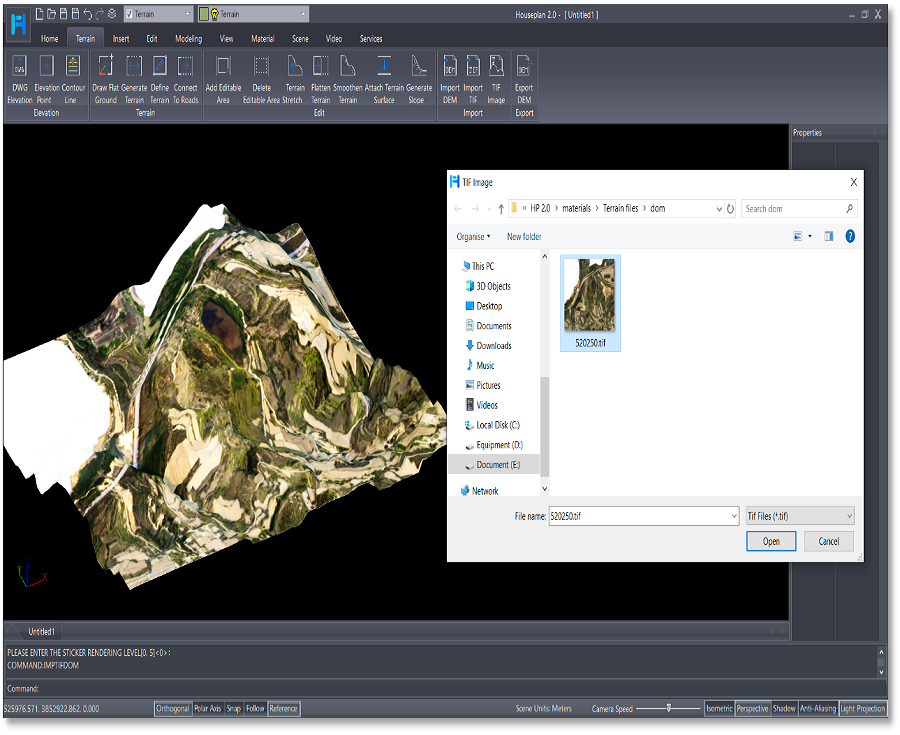
Houseplan 2.0 has taken a significant leap forward with the introduction of its rich Terrain features, making it an even more powerful tool for architects, designers, and builders.
Terrain Menu in nutshell — Your Quick Guide to Houseplan’s new capabilities
Houseplan 2.0 has introduced an exciting Terrain Menu packed with advanced features that empower users to effectively manage and design terrain-related content. This new menu enhances the overall functionality of the software, making it easier for architects, designers, and builders to work with terrain data.
To access the Terrain Menu in Houseplan:
Open your project in Houseplan >> Navigate to the main menu at the top of the interface > > Click on Terrain to reveal the available options and tools.

Benefits of Using the Terrain Menu
Efficiency
The Terrain Menu streamlines the process of terrain design, reducing the time spent on manual adjustments and allowing users to focus on creative aspects.
Realism
By incorporating real-world terrain data and features, users can create designs that are not only aesthetically pleasing but also practical and functional.
Flexibility
The range of tools and options available in the Terrain Menu provides users with the flexibility to experiment with different design ideas and scenarios.

Key Features of the Terrain Menu
The Terrain Menu in Houseplan 3D software is a significant enhancement that allows users to manage and design terrain-related content with ease. With its advanced features and tools, users can create realistic and functional outdoor environments that complement their architectural designs. Embrace the power of the Terrain Menu and take your projects to new heights!
Quick Terrain Creation and Editing
Draw Rectangular Terrain: Create rectangular terrain directly or opt for versatile polygonal terrain by entering “P” for polygons.
Generate Terrain Based on Contours: Efficiently generate terrain using contour lines and elevation points for accurate landscape modeling.
Select Closed Polylines: Generate terrain from closed polylines, undefined faces, mesh faces, or FBX models seamlessly.
Connect Terrain to Roads: Integrate terrain with roads based on elevation information, ensuring seamless connections.
Create Sloped Terrain: Generate sloped terrain at the base of an entity within the specified terrain range.
Select Line Entities: Choose line entities on the terrain and generate sloped terrain according to specified parameters.

Elevation Point Management:
Create Precise Elevation Points: Effortlessly establish elevation points at specified locations with defined values.
Convert Numbers into Elevation Points: Quickly convert numerical values in the scene into elevation points in batches, streamlining the workflow.
Adjust Elevation Points: Accurately reposition elevation points to ensure precise alignment, enhancing the integrity of your terrain designs.

Terrain Editing Tools and Editable Areas:
The Terrain Menu includes a range of editing tools that enable users to sculpt and modify terrain easily, adjusting heights, adding features like valleys, and add hills.
Define/Remove Editable Terrain Areas: Specify editable terrain areas to enhance control over modifications, significantly speeding up the editing process.
Adjust Editable Area: Stretch, drag, and modify levels within the editable area to fine-tune your design.
Place Entities on Terrain Surface: Easily place or attach entities to the terrain surface for better integration.

Terrain Data Import/Export
Houseplan 2.0 has the ability to import and export terrain data in various formats for collaboration and compatibility.
IMPORTELEV: Import DWG and DXF drawings with containing elevation data, and converting them into elevation points or contour lines.
IMPORTDEM: Import terrain files in DEM format directly into the scene.
IMPTIFDEM: Import terrain files in TIF format to generate corresponding terrain.
IMPTIFDOM: Apply TIF maps to the terrain as materials for enhanced visual representation.
EXPORTDEM: Export terrain data as a .dem file easily.

Contour Line Creation made easy
Draw Contour Lines: Easily create contour lines using a process similar to drawing polylines.
Select Undefined Line Entities: Designate undefined line entities as contour lines to simplify your workflow.
Generate Contour Lines: Automatically generate contour lines based on terrain elevation data and height differences, providing a clear illustration of topographical variations.
Dim or Label Elevation Values: Directly label the elevation value of contour lines at selected locations for better clarity.

Download Houseplan 2.0 and try for free!
The Terrain Menu in Houseplan 2.0 is a significant enhancement that allows users to manage and design terrain-related content with ease. With its advanced features and tools, users can create realistic and functional outdoor environments that complement their architectural designs. Embrace the power of the Terrain Menu and elevate your projects to new heights!

Discover more from Gstarsoft's Blog
Subscribe to get the latest posts sent to your email.