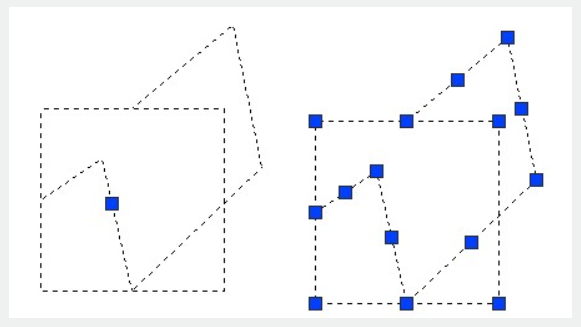
How to disassociate compound objects

Compound objects like polylines, dimensions, hatches or block references can be converted into individual elements.

You can convert a complex entity, such as a block or polyline, from a single entity into its component parts. Exploding a polyline, rectangle, donut, polygon, dimension, or leader reduces it to a collection of individual line and arc entities that you can then modify individually. Blocks are converted to the individual entities, possibly including other, nested blocks that composed the original entity.

With the following exceptions, exploding an entity usually has no visible effect on a drawing:

-If the original polyline had a width, the width information is lost when you explode it.

-If you explode a block containing attributes, the attributes are lost, but the original attribute definitions are retained.

-Colors, linetypes, lineweights, and print styles assigned BYBLOCK may be different after exploding an entity, because they will adopt the default color, linetype, lineweight, and print style until inserted into another block.

GstarCAD Blog

www.gstarcad.net

Related Posts

GstarCAD 2026 DWG Comparison: Boost Design Efficiency

GstarCAD 2026 has introduced a new DWG Compare tool designed to eliminate the manual effort of identifying revisions between drawing versions. By using the COMPARE command, the software automatically highlights additions in red, deletions in green, and identical elements in gray using revision clouds. This feature streamlines the proofreading process for architects and engineers, allowing for instant visual verification of changes across any DWG file.

How to Calculate CAD Area Quickly?

As a CAD designer, are you frustrated by the cumbersome and error-prone manual CAD area calculation? GstarCAD offers multiple efficient CAD area calculation methods!

Leave a Reply

Don't Miss out

Gstarsoft Showcases Integrated CAD + BIM Solutions at BIM World Paris 2026

  • April 3, 2026
Gstarsoft Showcases Integrated CAD + BIM Solutions at BIM World Paris 2026

Boost CAD Productivity with GstarCAD 2026’s XTP Import Feature

  • March 24, 2026
Boost CAD Productivity with GstarCAD 2026’s XTP Import Feature

Case study: How TopenTech Optimized Equipment Diagnostics and Field Productivity with GstarCAD

  • March 9, 2026
Case study: How TopenTech Optimized Equipment Diagnostics and Field Productivity with GstarCAD

The Ultimate Guide to GstarCAD Mechanical 2026: The Future of Manufacturing Design

  • January 30, 2026
The Ultimate Guide to GstarCAD Mechanical 2026: The Future of Manufacturing Design

GstarCAD 2026 DWG Comparison: Boost Design Efficiency

  • January 16, 2026
GstarCAD 2026 DWG Comparison: Boost Design Efficiency

How to Calculate CAD Area Quickly?

  • December 25, 2025
How to Calculate CAD Area Quickly?

Discover more from Gstarsoft's Blog

Subscribe now to keep reading and get access to the full archive.

Continue reading

