


There are 3 things about Text Style we need to pay attention to.
- Give TextStyle a different name
When creating a text style, the default style name would be like Style 1, Style 2, but we’d better not use them, because name this like doesn’t help.


There are many ways to name a text style, one of them is to name the text style after its purpose, for example, frame text, dimension text, etc.
2. To specify text style settings before hand
After we finish the Text style settings, we’ll need to specify which text style to use, as shown in the following picture,


3. How to set text height in text style
By default, the height for font in dialog box is 0, as shown in the following picture,

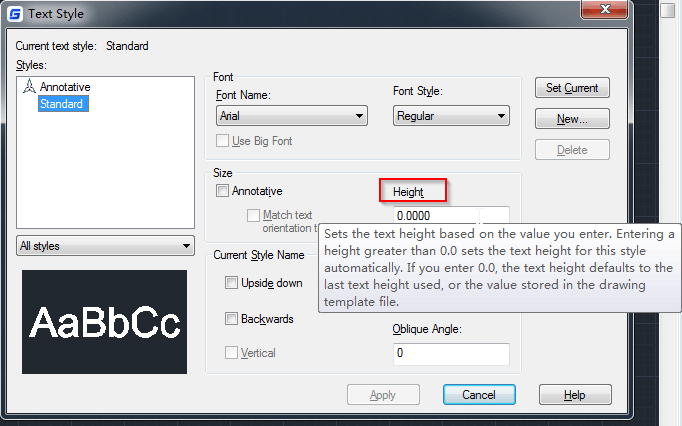
In this case, we will be prompted to enter text height when we enter single-line text, the text height of dimension can be changed any time.
If we need to specify the height, we can enter a number such as 3, this way, the new text height will apply to newly-created single-line text as well as dimension using this text style.